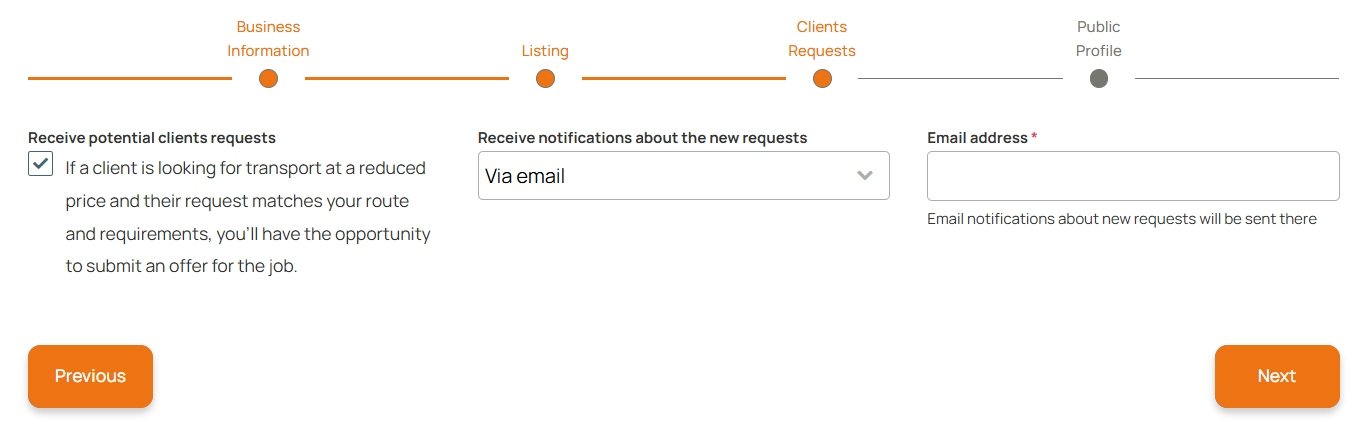
Transport requests are a great opportunity to contact potential clients directly, especially if you are ready to offer a special price for this route. To make the requests tool active for you, specify a contact email or phone number in your business profile during setup. These details will be displayed for customers to reach you.
If your Requests tool is enabled, you will see the confirmed status on your dashboard. Otherwise, you can activate the feature at any time.
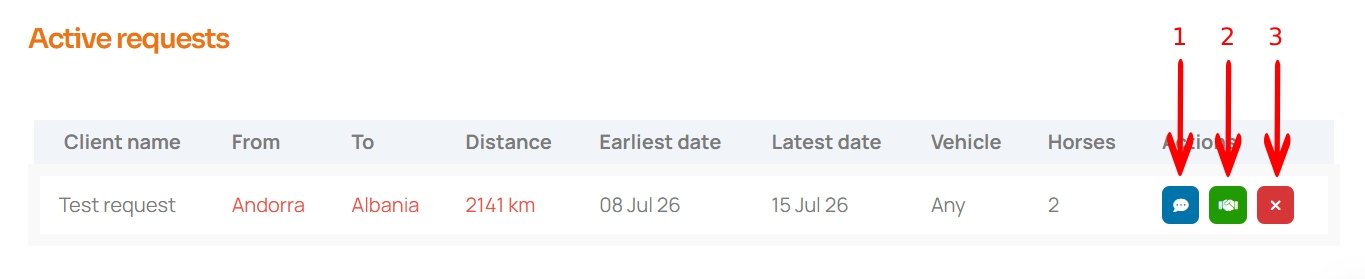
You will see all active transport requests that meet your business details in the “Active Requests” section. You can see three action buttons for each request: 1. Ask a question. If you need more details about the request, you can ask the client directly. 2. Make an offer. If you are ready to take this request, you can offer your price for the client. Please note: the number of offers you can send depends on your subscription plan. If you exceed your plan’s offer limit, you can send additional offers using funds from your deposit. 3. Remove the request. If you are not interested in this request, you can remove it so it no longer appears on your dashboard.
If the client has a registered account at move.horse, you can communicate with them on the portal. In this case, once the client replies to you, you will get the notification. Otherwise, we’ll send the client your question or offer along with your contact details, so they’ll contact you directly if they are interested.